Choosing the best Ethernet cable for gaming can help you build a more stable and reliable wired network. When playing online games, a smooth connection matters because sudden lag, packet loss, or connection drops can interrupt your gameplay. While your internet plan and router have a major impact on network performance, the Ethernet cable connects your gaming device directly to that network and should not be overlooked.
Ethernet cables come in different categories, including Cat 5e, Cat 6, Cat 6A, and Cat 8. Each category supports different networking capabilities, but the most expensive or highest-rated cable is not always necessary for every gamer. The right choice depends on your internet speed, network equipment, cable length, and gaming setup.
In this guide, we will explain what makes an Ethernet cable suitable for gaming and what features you should consider before buying one. You will also learn how cable categories differ, why a wired connection can be useful for gaming, and how to choose a cable that fits your setup without spending more than necessary.
Why the Best Ethernet Cable for Gaming Matters
Many gamers believe that buying the fastest internet package automatically guarantees the best gaming experience. While internet speed is important, the quality of your connection is equally critical. A poor-quality Ethernet cable can reduce stability, create connection drops, and increase packet loss, all of which negatively affect online gameplay.
A high-quality Ethernet cable creates a direct connection between your gaming device and your router. This wired connection avoids many of the issues that wireless networks experience, including signal interference, congestion, and inconsistent performance. Competitive gamers especially benefit from stable network performance because even small interruptions can affect reaction times during intense matches.
Another advantage is consistency. Wireless signals fluctuate depending on distance, walls, and nearby electronic devices. Ethernet cables deliver a much more reliable connection from start to finish. Whether you are downloading a large game update, streaming your gameplay, or playing online with friends, a wired network provides dependable performance.
Modern Ethernet cables also support faster network speeds and higher bandwidth. Choosing the correct cable today ensures your gaming setup remains compatible with future internet upgrades. Investing in a quality cable is an affordable way to improve your overall gaming experience without replacing expensive hardware.
Ethernet vs Wi-Fi for Gaming
Many players wonder whether Ethernet is really better than Wi-Fi. For most online gaming situations, the answer is yes.
Wi-Fi has improved significantly with newer standards such as Wi-Fi 6 and Wi-Fi 7. However, wireless connections still face several limitations. Signals travel through walls, floors, furniture, and other electronic devices before reaching your gaming system. These obstacles can weaken the connection and introduce instability.
Ethernet cables avoid these problems by providing a direct physical connection between the router and your device. This results in lower latency, fewer connection interruptions, and more consistent network performance.
Here are the biggest differences:
- Ethernet delivers a stable connection.
- Wi-Fi is more convenient but less predictable.
- Ethernet experiences less interference.
- Wired gaming usually produces lower ping.
- Packet loss is less common with Ethernet.
- Ethernet provides consistent download speeds.
- Large game updates often download faster through Ethernet.
- Competitive gamers generally prefer wired connections.
- Streaming while gaming is smoother on Ethernet.
- Ethernet connections require minimal maintenance.
If your gaming setup allows it, Ethernet remains the preferred choice for players who value stability and performance.
Understanding Ethernet Cable Categories
Not every Ethernet cable offers the same performance. Different cable categories support different speeds, bandwidth capacities, and shielding technologies. Understanding these categories helps you choose the best cable for your needs.
Cat5e
Cat5e remains one of the most common Ethernet cables. It supports speeds up to 1 Gbps over distances up to 100 meters. For many households, Cat5e still performs well for online gaming.
Cat6
Cat6 improves bandwidth and reduces interference. It supports speeds up to 10 Gbps over shorter distances and offers better overall performance than Cat5e.
Cat6a
Cat6a provides higher bandwidth and stronger shielding. It maintains 10 Gbps speeds across the full 100-meter distance, making it an excellent choice for demanding gaming environments.
Cat7
Cat7 includes advanced shielding that minimizes electromagnetic interference. While it supports very high speeds, many home gamers may not fully utilize its capabilities.
Cat8
Cat8 represents the newest generation designed primarily for professional networking and data centers. It supports extremely high speeds but is often unnecessary for typical home gaming setups.
For most gamers today, Cat6 or Cat6a offers the ideal balance between price, speed, durability, and future compatibility.
Key Features to Look for in the Best Ethernet Cable for Gaming
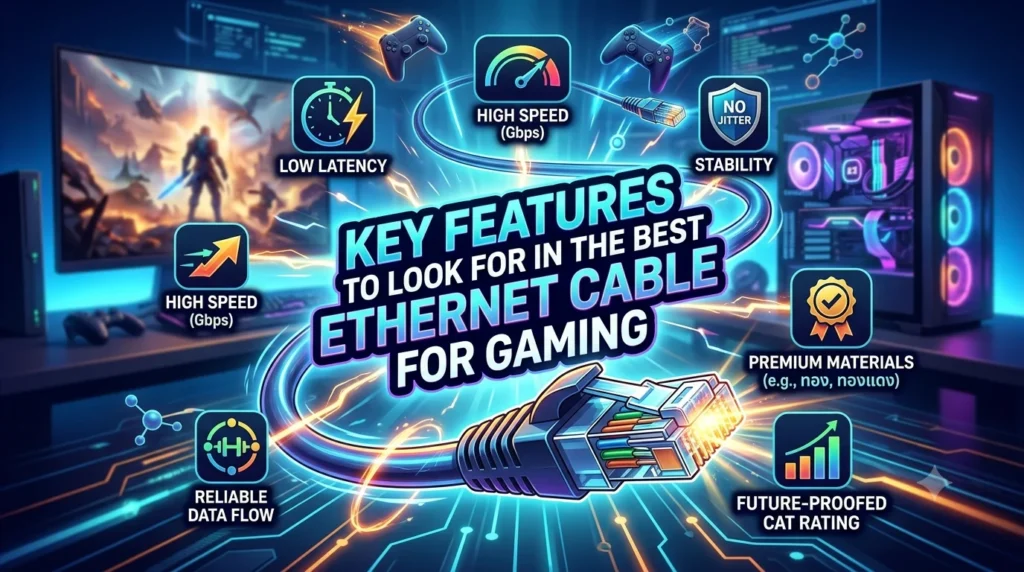
Selecting an Ethernet cable involves more than simply choosing the newest category. Several important features determine long-term performance and reliability.
Speed Support
Choose a cable that supports both your current internet plan and potential future upgrades.
Bandwidth
Higher bandwidth allows more data to move efficiently across your network.
Shielding
Shielded cables help reduce electromagnetic interference, especially in environments with many electronic devices.
Build Quality
Quality insulation, strong connectors, and durable outer jackets improve lifespan and reliability.
Cable Length
Buy only the length you need. Extremely long cables can create unnecessary clutter, while cables that are too short limit flexibility.
Connector Quality
Gold-plated connectors resist corrosion and maintain consistent signal quality over time.
Flexibility
Flexible cables are easier to route behind desks, gaming consoles, entertainment centers, and PC setups.
Compatibility
Ensure the cable works with gaming PCs, PlayStation, Xbox, Nintendo Switch, routers, modems, and network switches.
Considering these features helps you purchase a cable that performs reliably for years while supporting future networking technology.
Does Ethernet Cable Affect Gaming Ping?
One of the most common questions gamers ask is whether changing an Ethernet cable can lower ping. The answer depends on the condition and category of the cable.
Ping measures how quickly information travels between your gaming device and the game server. A damaged, low-quality, or poorly connected cable may introduce instability or packet loss, which can negatively affect gameplay. However, replacing a functioning Ethernet cable with a newer category does not automatically reduce ping if your existing cable already supports your internet speed.
Factors that have a greater impact on ping include:
- Distance to the game server.
- Internet Service Provider quality.
- Network congestion.
- Router performance.
- Background downloads.
- Local network traffic.
A quality Ethernet cable contributes to a stable connection by reducing interference and maintaining consistent data transmission. While it is not a magic solution for high latency, it plays an important role in building a reliable gaming network.
Cat6 vs Cat6a vs Cat7 vs Cat8 for Gaming
Choosing between Cat6, Cat6a, Cat7, and Cat8 can be confusing because each cable supports different speeds and bandwidth. The good news is that most gamers do not need the most expensive option. The right cable depends on your internet speed, gaming setup, and future upgrade plans.
Cat6
Cat6 is one of the most popular choices for gamers. It supports up to 10 Gbps over shorter distances and provides excellent performance for online gaming, streaming, and downloading large game files. It is affordable and widely available.
Cat6a
Cat6a improves upon Cat6 by supporting 10 Gbps over the full 100-meter distance. It also includes better shielding to reduce electromagnetic interference. This makes it ideal for gamers with larger homes or more advanced networking setups.
Cat7
Cat7 offers additional shielding and higher bandwidth than Cat6a. It performs well in environments with significant electrical interference. However, many home users will not notice a major gaming advantage over Cat6a.
Cat8
Cat8 is designed mainly for enterprise networks and data centers. It supports extremely high speeds over shorter distances. While impressive, its capabilities exceed the needs of most home gamers.
Which One Should You Buy?
For most gaming setups:
- Cat6 offers the best value.
- Cat6a is excellent for future-proofing.
- Cat7 suits specialized environments.
- Cat8 is unnecessary for the average gamer.
Investing in Cat6 or Cat6a provides outstanding gaming performance without overspending.
Shielded vs Unshielded Ethernet Cables
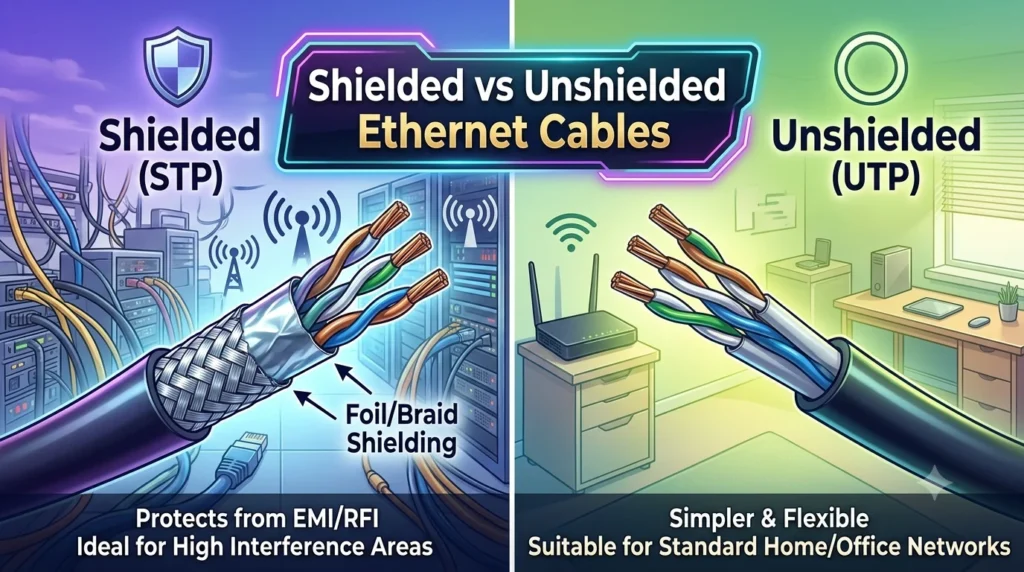
One important feature many buyers overlook is cable shielding. Shielding protects network signals from electromagnetic interference created by nearby electronic devices.
Unshielded Twisted Pair (UTP)
UTP cables are the most common option for home gaming.
Advantages include:
- Lower cost.
- Lightweight design.
- Flexible installation.
- Excellent performance in normal home environments.
- Easy cable management.
Shielded Twisted Pair (STP)
STP cables contain additional protective shielding around the wires.
Benefits include:
- Better resistance to electrical interference.
- Improved signal quality.
- Greater stability near power cables.
- Useful for professional gaming rooms.
- Ideal for offices with heavy electronic equipment.
For most households, UTP cables perform perfectly well. However, if your gaming setup is surrounded by many electronic devices or long cable runs, an STP cable may provide extra reliability.
How Cable Length Affects Gaming Performance
Many gamers wonder whether a longer Ethernet cable slows down their connection. In most home setups, the answer is no.
Modern Ethernet standards are designed to maintain full performance for cable lengths up to 100 meters (328 feet). Within this range, gamers should experience consistent speeds and stable connections.
However, extremely long cables can create practical issues.
Consider these tips:
- Buy only the length you actually need.
- Avoid tightly bending the cable.
- Keep cables away from strong electrical equipment.
- Prevent cable damage from furniture.
- Replace worn or damaged cables immediately.
Common cable lengths include:
- 3 feet (1 meter).
- 6 feet (2 meters).
- 10 feet (3 meters).
- 25 feet (7.5 meters).
- 50 feet (15 meters).
- 100 feet (30 meters).
A properly installed cable maintains excellent gaming performance regardless of normal household distances.
Best Ethernet Cable Features for Competitive Gaming
Competitive gaming demands consistency more than anything else. Whether you play first-person shooters, battle royale games, racing simulators, or esports titles, a stable connection can improve your overall experience.
When shopping for the best gaming Ethernet cable, prioritize these features:
- Cat6 or Cat6a certification.
- Durable outer jacket.
- High-quality RJ45 connectors.
- Gold-plated contacts.
- Flexible cable design.
- Strong strain relief.
- Reliable shielding if needed.
- High bandwidth support.
- Backward compatibility.
- Trusted manufacturer.
These features improve long-term reliability and reduce the likelihood of connection problems during important gaming sessions.
Common Ethernet Cable Mistakes Gamers Should Avoid
Many gamers unknowingly make networking mistakes that reduce performance. Avoiding these simple errors helps maintain a fast and reliable connection.
Buying More Than You Need
Expensive cables do not automatically improve gaming performance.
Using Damaged Cables
Bent connectors or worn insulation can affect signal quality.
Ignoring Router Placement
Even wired networks benefit from proper router positioning.
Running Cables Near Power Lines
Electrical interference can reduce signal quality over long distances.
Skipping Firmware Updates
Updating your router often improves stability and security.
Poor Cable Management
Tangled cables are harder to maintain and easier to damage.
Choosing Unknown Brands
Well-known networking brands usually provide better quality control and durability.
Following these best practices helps create a cleaner, more dependable gaming setup that performs consistently over time.
Top Brands That Make Quality Ethernet Cables
Choosing a trusted brand is just as important as choosing the right cable category. Well-known manufacturers usually follow industry standards and use durable materials that last for years.
Some of the most reliable Ethernet cable brands include:
- Cable Matters
- CableCreation
- UGREEN
- Monoprice
- Jadaol
- Vandesail
- Amazon Basics
- StarTech
- Tripp Lite
- Belkin
These brands offer cables in different lengths and categories, making it easy to find one that fits your gaming setup and budget. Always buy from reputable sellers to avoid counterfeit or poor-quality products.
How to Install an Ethernet Cable for the Best Gaming Experience
Installing an Ethernet cable correctly helps you get the best performance from your internet connection. Fortunately, the process is simple.
Follow these steps:
- Turn off your gaming device if necessary.
- Connect one end of the Ethernet cable to your router or modem.
- Connect the other end to your gaming PC or console.
- Make sure both connectors click securely into place.
- Restart your device if required.
- Check that the wired connection is active.
- Run an internet speed test.
- Launch your favorite online game and enjoy a stable connection.
For the best results, avoid bending the cable sharply or placing heavy objects on it. Proper installation protects the cable and ensures consistent performance over time.
Future-Proofing Your Gaming Network
Technology evolves quickly, and internet speeds continue to improve. Buying an Ethernet cable that supports future upgrades is a smart investment.
Here are a few tips to future-proof your setup:
- Choose Cat6a if you plan to upgrade your internet speed.
- Use a modern router that supports gigabit or multi-gig connections.
- Keep your router firmware updated.
- Replace old networking equipment when necessary.
- Organize cables to prevent wear and damage.
- Upgrade your network switch if you use multiple wired devices.
Future-proofing today can save money later by reducing the need for frequent cable replacements.
Conclusion
Choosing the best Ethernet cable for gaming does not have to be complicated. A reliable cable can provide a stable wired connection between your gaming device and router, helping you avoid some of the wireless issues that can affect online gameplay. The key is to choose a cable that matches your internet speed, networking equipment, cable length, and gaming needs.
For many gaming setups, a good-quality Cat 6 cable is a practical choice. Cat 5e can also be suitable for networks that do not require higher speeds, while Cat 6A can be useful for faster network connections and longer cable runs. Higher-category cables are not automatically better for gaming if your internet service and hardware cannot take advantage of their additional capabilities.
Before buying, consider the cable category, build quality, length, connector quality, and installation environment. Avoid choosing a cable based only on marketing claims or a higher category number.
Ultimately, the best Ethernet cable for gaming is the one that supports your network properly and gives you a dependable connection without unnecessary cost.
FAQs
1. What is the best Ethernet cable category for gaming?
For most gamers, Cat6 is the best choice because it offers excellent speed, reliability, and value. Cat6a is ideal if you want additional future-proofing.
2. Does an Ethernet cable reduce gaming lag?
A quality Ethernet cable cannot eliminate lag completely, but it provides a more stable connection than Wi-Fi, helping reduce packet loss and connection interruptions.
3. Is Cat8 worth buying for gaming?
For most home gaming setups, no. Cat8 is designed mainly for enterprise environments and offers features that typical gamers rarely need.
4. How long can an Ethernet cable be without losing performance?
Standard Ethernet cables maintain full performance for distances up to 100 meters (328 feet) when they meet the appropriate specifications.
5. Is Ethernet better than Wi-Fi for online gaming?
Yes. Ethernet generally provides lower latency, greater stability, fewer connection drops, and more consistent speeds than Wi-Fi, making it the preferred choice for competitive online gaming.